
Predict ALD Film Thickness
Will this recipe land inside the ALD window, and what thickness will it produce? Enter your process conditions and get GPC, final thickness, uniformity, film density, refractive index, and step coverage on one screen.
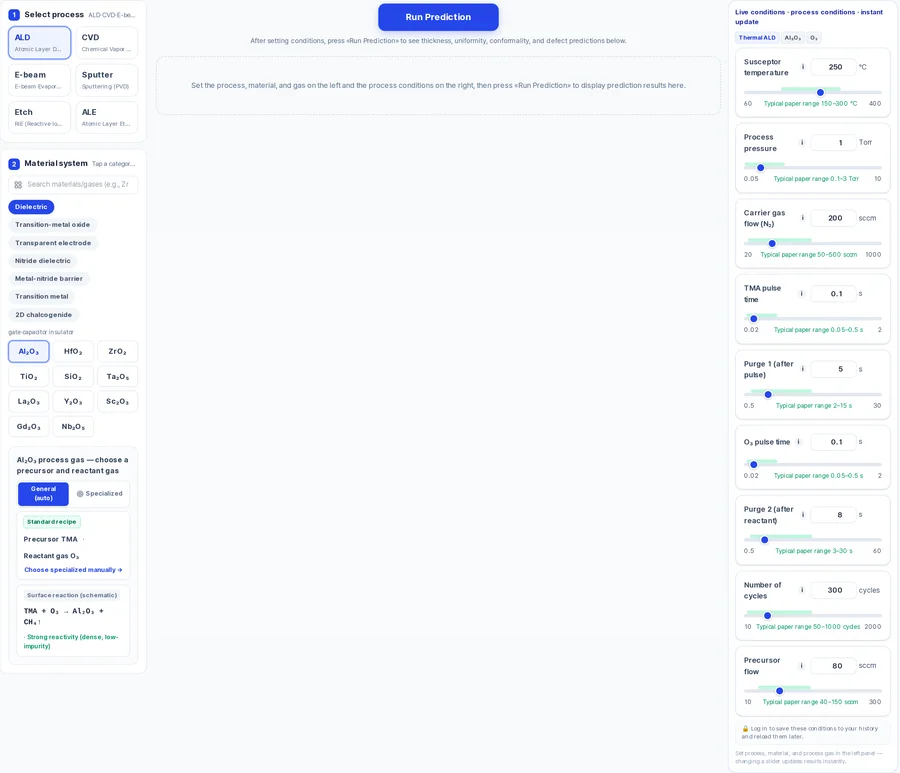
What you enter
Film material and precursor pair
Choose from 42 film materials (e.g. Al₂O₃ with TMA–H₂O); each material defines its own valid temperature window.
Susceptor temperature
Adjustable from 60 to 400 °C; the slider highlights the literature ALD window for the selected film (150–300 °C for Al₂O₃).
Process pressure
0.05–10 Torr, default 1.0 Torr.
Precursor pulse and purge
Pulse 0.02–2 s (default 0.1 s), purge 0.5–30 s (default 5 s); co-reactant pulse 0.02–2 s, purge 2 up to 60 s (default 8 s).
Carrier N₂ flow
20–1000 sccm, default 200 sccm.
Cycles
10–2000, default 300.
RF plasma power (PE-ALD)
50–1000 W; appears when you select a plasma co-reactant.
What you get
GPC
Growth per cycle in Å/cycle, driven by precursor and co-reactant saturation.
Final thickness
Predicted film thickness in nm for the cycle count you set (GPC × cycles).
Uniformity
Thickness uniformity percentage with a 2D wafer map.
Step coverage at AR 20:1
Conformality percentage at a fixed aspect ratio of 20:1.
Film density and refractive index
Density in g/cm³ and refractive index at 632 nm.
Saturation bars
Precursor and co-reactant saturation percentages, plus a gas-phase (CVD-like) mixing fraction bar.
Optimal-conditions panel
Suggested conditions for the selected film, with clickable fixes when the recipe falls outside the ALD window.
How to use it
- 1Open the Process design tab and click the ALD button.
- 2Select your film material, then the precursor and co-reactant gas.
- 3Set temperature, pressure, pulse/purge times, flow, and cycles with the sliders.
- 4Press Run Prediction — guests can run without an account; logged-in members spend 10 credits per run.
- 5If the temperature-window verdict flags condensation or decomposition, click the suggested fix to adjust.
How the prediction is made
Predicted thickness equals GPC multiplied by the number of cycles. GPC itself depends on how completely the precursor and co-reactant pulses saturate the surface, which the model calculates from your pulse time, purge time, flow rate, pressure, and temperature. Saturation bars on screen show how close each half-cycle is to full coverage.
A temperature-window check runs automatically. If the susceptor temperature is below the ALD window, the model flags co-reactant condensation risk. If it is above, precursor decomposition drives gas-phase growth and the mixing-fraction bar rises. Inside the window, the verdict reads stable ALD region.
When saturation is low or the temperature verdict is unfavorable, clickable fix suggestions appear — for example, lengthening the pulse or reducing carrier flow. The confidence percentage shown on screen is labeled as a demo model, so treat the results as design-reference estimates to verify on your own equipment.
Limits to keep in mind
- The on-screen confidence score is labeled "(demo)" — results are design-reference estimates, not calibrated to a specific tool.
- There is no thickness-vs-cycles chart; thickness is reported for the single cycle count you enter.
- The step-coverage number in the main results is fixed at AR 20:1. Open the feature-profile panel to evaluate other aspect ratios.
- Predictions are based on a physics model with literature-range coefficients. Confirm critical values on your equipment.
FAQ
- How accurate is the ALD thickness prediction?
- The model uses physics-based saturation and temperature-window logic built on published data. A confidence percentage appears on screen, but it is labeled as a demo model. Use the result as a design reference and validate on your own tool.
- Can I predict PE-ALD films?
- Yes. Choose a plasma co-reactant in the gas selection and an RF plasma power input (50–1000 W) appears alongside the pulse and purge settings. The same outputs — GPC, thickness, uniformity and saturation — are then reported for the plasma process.
- Do I need an account to try the ALD prediction?
- No. Guests can run predictions in the Process design tab without creating an account. Logged-in members receive free credits on sign-up; each prediction run costs 10 credits.