
Predict Step Coverage
Will your film coat the bottom of a high-AR trench, or will it pinch off at the top? Set the feature geometry and process conditions to see step coverage, a 3D cut view, and a stable-process-region map.
What you enter
Feature geometry
Choose trench or via (cylinder) in the Process design tab feature-profile panel.
Aspect ratio
5–100, default 20.
Opening width or via diameter
20–300 nm, default 100 nm.
Deposition method (stacked-structure tab)
ALD, CVD (thermal/LPCVD), PECVD, MOCVD, PVD/sputter, evaporation, spin, plating, or epitaxy.
Target thickness
Set in the Stacked-structure Deposition tab along with structure AR, temperature, pressure, RF power, and exposure.
Process conditions (process tab)
Same conditions as the ALD, CVD, or PVD recipe you are evaluating — temperature, pressure, pulse/purge, flow, and cycles.
What you get
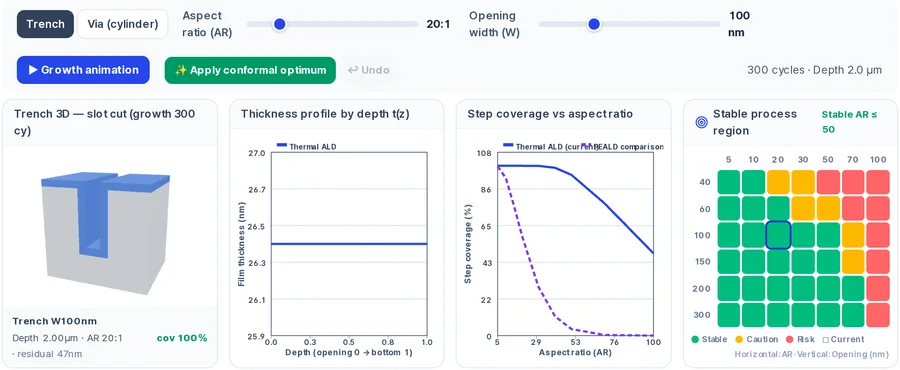
3D trench or via cut view
Interactive cross-section showing the deposited film inside the feature, with a growth animation.
Thickness vs depth profile
A t(z) plot showing film thickness from top to bottom of the feature.
Step coverage vs AR curve
Coverage plotted against aspect ratio, with a comparison curve (e.g. thermal ALD vs PE-ALD).
Stable-process-region map
A map over AR × opening width marking where coverage ≥ 90 % with no pinch-off.
Pinch-off and void notes
Warnings when the feature entrance closes before the trench fills.
Gap-fill result (stacked-structure tab)
Reports whether the fill produces a void, keyhole, or seam, with coverage-vs-AR and deposition window maps.
How to use it
- 1In the Process design tab, select your deposition method (ALD, CVD, or PVD) and set process conditions.
- 2Open the feature-profile panel and choose trench or via, then set aspect ratio and opening width.
- 3Run the prediction and review the 3D view, t(z) profile, and coverage-vs-AR curve.
- 4For multi-layer stacks, switch to the Stacked-structure Deposition tab, pick a method, and set the target thickness and structure AR.
- 5Use the Apply conformal optimum button if you want the tool to push conditions toward high coverage.
How the prediction is made
Step coverage is defined as the film thickness at the bottom of the feature divided by the thickness at the top, multiplied by 100. A value of 100 % means perfectly conformal coating. The model calculates this ratio as a function of aspect ratio and opening size for the conditions you set.
Different deposition regimes use different physical models. Thermal ALD follows a Knudsen penetration model, where precursor molecules bounce along the feature walls until they react. PE-ALD uses a radical-recombination-limited model, in which plasma radicals are lost on the walls before they reach the bottom. CVD combines Knudsen diffusion with reaction consumption, and PVD uses a line-of-sight shadowing model.
The stable-process-region map scans the AR × opening space and shades the zone where coverage stays above 90 % with no pinch-off. Points outside that zone indicate risk of voids or incomplete bottom coverage. In the Stacked-structure Deposition tab, a deposition-window map and gap-fill result extend this analysis to real stack geometries.
Limits to keep in mind
- Model coefficients are still being fine-calibrated against extracted papers; an on-screen badge notes this.
- The headline step-coverage number in the Process design tab is fixed at AR 20:1. Use the feature-profile panel slider to evaluate your own aspect ratio.
- The process-tab feature-profile panel is available for ALD, CVD, and PVD; other methods are accessible through the Stacked-structure Deposition tab.
- Results are design-reference estimates. Validate critical coverage targets on your equipment.
FAQ
- How does aspect ratio affect ALD step coverage?
- Step coverage generally drops as aspect ratio increases because the precursor must diffuse deeper before the pulse ends. The coverage-vs-AR curve on screen shows this relationship for your conditions, and a comparison curve highlights how thermal ALD and PE-ALD behave differently at the same AR.
- Can this tool predict gap-fill voids?
- Yes. In the Stacked-structure Deposition tab, the gap-fill result reports whether the fill produces a void, keyhole, or seam. The 3D view and front cross-section show the deposition profile inside the feature so you can visualize where closure occurs.
- What physical models are used for step coverage?
- The model names are shown on screen. Thermal ALD uses Knudsen penetration, PE-ALD uses a radical-recombination-limited model, CVD uses Knudsen diffusion with reaction consumption, and PVD uses a shadowing model. These are listed so you know the assumptions behind each curve.