
Get Your Next Recipe
Which recipe should you run next to hit your target faster? Define your goal, lock the knobs you cannot move, and receive a ranked batch of recipes designed to maximize expected improvement with each iteration.
What you enter
Primary goal
Select a metric (e.g. thickness, uniformity, conformality) and set the direction: target a value, maximize, or minimize.
Secondary goal (optional)
Add a second metric with an adjustable weight to balance competing objectives.
Adjustable knobs and ranges
Choose which process conditions may move and set upper and lower bounds for each.
Batch size
Number of recipes per recommendation round: 3, 5, or 8 (default 3).
DOE start option
If you have no initial data, generate a Latin hypercube design of experiments with 8, 12, or 16 runs, exportable as CSV.
Target metrics (process-tab version)
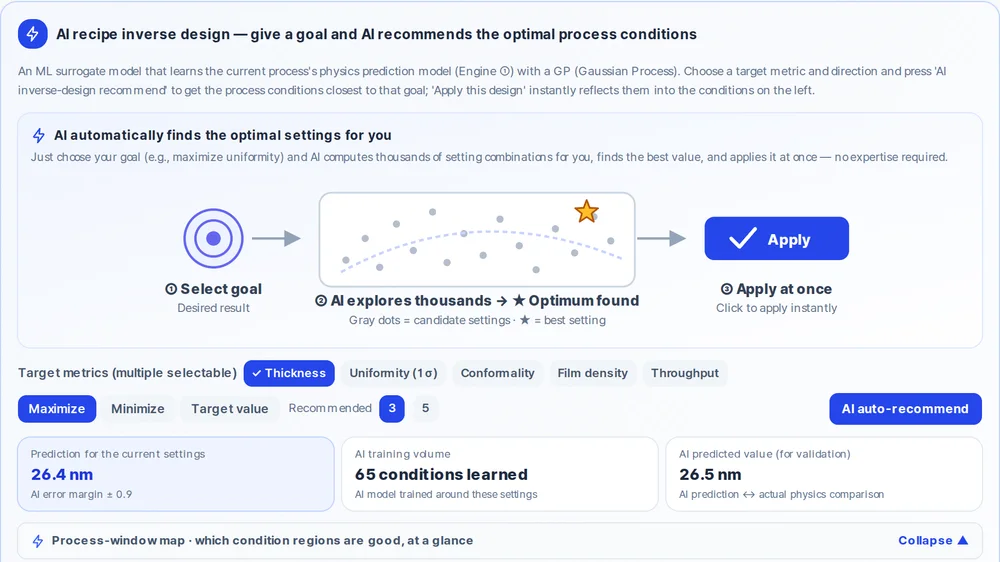
In the AI recipe inverse design panel on the Process design tab, choose from thickness, uniformity 1σ, conformality, film density, or throughput (etch metrics for etch processes), then request 3 or 5 recommendations.
What you get
Recommended recipe cards
Each card shows which conditions changed from the current baseline, the expected improvement, and a combined score when two goals are active.
View with these conditions
A button that loads the recommended recipe into the prediction panel so you can inspect the full output before running it on your tool.
DOE CSV export
When starting from scratch, the Latin hypercube plan exports as a CSV you can hand to your process team.
Process-tab Apply button
In the AI recipe inverse design panel, Apply pushes the selected recommendation into the left-side condition sliders for immediate review.
How to use it
- 1Upload your initial measurements in the My equipment data tab (or generate a Latin hypercube DOE if you have no data yet).
- 2Open the Next recipe recommendation panel (stage 3 in My equipment data) and set your primary goal.
- 3Configure which knobs may move, their ranges, and the batch size.
- 4Run the recommended recipes on your tool, enter the measured results, and click Add run.
- 5Repeat — the model retrains after each round, and the next batch targets the most informative region of your process space.
How the prediction is made
The recommendation engine uses Bayesian optimization with an expected-improvement acquisition function. It evaluates where in your allowed process space the next experiment is most likely to improve on the current measured outcome, balancing exploration of untested conditions against exploitation of regions already known to perform well.
Each batch is selected for diversity so the recipes are not clustered in one corner of the space. When two goals are active, the combined score weights them according to the ratio you set. After you run the recipes and enter the results, the underlying model retrains and the next batch shifts accordingly — an active-learning loop.
The process-tab AI recipe inverse design panel offers a lighter version of this workflow. It learns from the physics model alone and does not incorporate your measured data. Once you have several runs in My equipment data, switch to the full Bayesian optimization path there to get recommendations grounded in your tool's actual behavior.
Limits to keep in mind
- The recommendation model is labeled on screen as "based on a demo learned model" — treat suggested recipes as informed starting points, not guaranteed optima.
- The process-tab AI recipe inverse design does not use your uploaded measurements. For data-informed recommendations, use the My equipment data tab.
- With very few measured runs the model has wide uncertainty, so early batches emphasize exploration over exploitation.
- The batch sizes available are 3, 5, or 8 recipes per round. Larger custom batch sizes are not supported.
FAQ
- How should I start if I have no measured data at all?
- Use the Latin hypercube design-of-experiments option. It generates a space-filling set of 8, 12, or 16 initial recipes as a CSV. Run them on your tool, enter the results, and the Bayesian optimization loop takes over from there.
- Can I use recipe recommendations without uploading my own data?
- Yes. The AI recipe inverse design panel in the Process design tab generates recommendations from the physics model alone. It is useful for a quick directional check, but it does not learn from your tool's measured behavior. For that, use the My equipment data version.
- How many recipes does the tool suggest per iteration?
- You choose a batch size of 3, 5, or 8 (default 3). Each recipe card shows which conditions changed and the expected improvement. A diverse batch helps cover the process space efficiently so you get useful information from every round.