
Predict Etch Profiles
How deep will it etch, and will the sidewall stay vertical? Run a single-layer RIE or ALE prediction in the Process design tab, or load one of 26 DRAM, NAND, and Logic stack presets to get 18 detailed etch metrics and a 3D cross-section.
What you enter
Etch process type
Choose RIE or ALE in the Process design tab; the Stacked-structure Etching tab handles multi-layer stacks.
Chamber pressure (RIE)
5–300 mTorr, default 30 mTorr.
Plasma and bias power (RIE)
Source and bias power settings for ion energy and radical density control.
ALE cycle parameters
Modification pulse, purge times, removal step, cycle count, and removal ion energy.
Stack structure preset
26 presets covering DRAM, NAND, and Logic architectures; configurable target AR (2–100), opening CD (10–300 nm), pitch, and ON/ON pair count (2–128).
Relative condition sliders (stack tab)
Bias, source power, pressure, temperature, passivation/O₂, bias frequency, pulse duty, loading, over-etch, and mask taper — each on a 0–1 relative scale.
Etch gas and hard mask
Select the etch chemistry and optional hard-mask material for stack etch runs.
What you get
Etch depth and etch rate
Depth in nm and rate in nm/min for the set conditions.
Selectivity
Etch rate ratio between the target material and the adjacent layer or mask.
Sidewall angle and undercut
Angle in degrees and CD bias in nm; ALE adds etch per cycle (EPC in Å/cycle) and synergy percentage.
3D etch profile
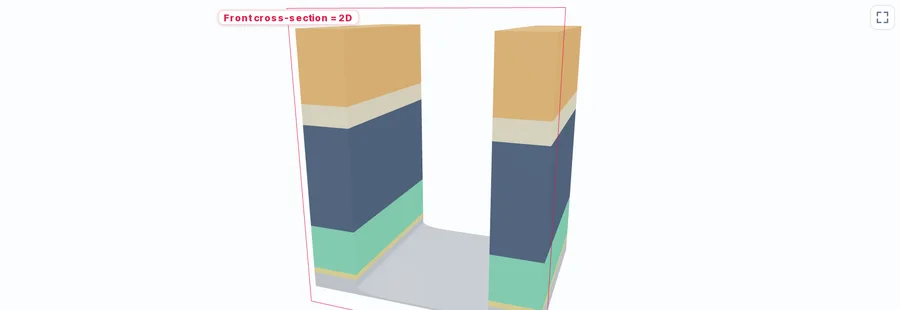
Interactive 3D view; the stack tab adds a 2D front cross-section.
18 stack-etch metrics
Including bowing CD, bottom CD bias, top/necking CD, mask loss and remaining mask, over-etch, footing, microtrench, twisting, and within-wafer non-uniformity.
ARDE / RIE-lag curve
Aspect-ratio-dependent etch rate curve showing how rate changes as the feature deepens.
Sub-tabs
Multi-step, ALE, window map, and response-curve panels for deeper analysis in the stack tab.
How to use it
- 1For a single layer, open the Process design tab, click Etch (RIE) or ALE, and set pressure, power, and time or cycle parameters.
- 2Run the prediction to see etch depth, sidewall angle, selectivity, and the 3D profile.
- 3For stacked structures, open the Stacked-structure Etching tab and choose one of the 26 presets or build a custom stack.
- 4Adjust the relative condition sliders (0–1) and run to get the full 18-metric report with a 3D and 2D cross-section.
- 5Use the ARDE curve and response-curve sub-tab to explore trade-offs between depth, profile, and selectivity.
How the prediction is made
The model balances physical (ion-driven) and chemical (radical-driven) removal. Moving the ion and radical settings shifts that balance, and the sidewall angle, etch rate and selectivity on screen move with it — which is what lets you compare directions before committing tool time.
In the stacked-structure tab, ARDE captures how etch rate falls as the feature deepens and ions scatter against the sidewalls. The 18 metrics — from bowing to microtrench to twisting — are extracted from the predicted 2D cross-section profile. Mask loss and remaining mask thickness help you decide whether the hard mask survives the process.
ALE in the process tab works on a per-cycle basis: modification (surface reaction), purge, removal (ion bombardment), purge. The synergy percentage indicates how much the alternating steps outperform continuous etching at the same ion energy, helping you gauge whether ALE offers a practical advantage for your target.
Limits to keep in mind
- The process-tab etch model is labeled on screen as a "demo rule model" — use it for directional comparisons, not absolute etch-rate values.
- Condition sliders in the Stacked-structure Etching tab are relative (0–1), not in tool-specific units such as watts or mTorr.
- Bowing, necking, and footing metrics are available in the stack tab; the single-layer process-tab view does not report bowing.
- Results are design-reference estimates for exploring trade-offs. Validate critical profiles with on-tool cross-section measurements.
FAQ
- Can I predict bowing in a high-aspect-ratio etch?
- Yes, but bowing is reported in the Stacked-structure Etching tab, not in the single-layer process tab. Load a preset or build a custom stack, set your target AR and opening CD, then check the bowing CD and 2D front cross-section in the results.
- Why are the stack-tab condition sliders relative instead of real units?
- The stack tab expresses each condition as a relative 0–1 position rather than watts, mTorr or degrees. Read the results as directions and trade-offs — for example, how raising bias moves bowing against selectivity — and set the absolute chamber values on your own tool.
- What does ALE synergy percentage mean?
- Synergy measures how much material removal the alternating modification-and-removal cycle achieves beyond what continuous etching at the same ion energy would remove. A high synergy value means the self-limiting surface-modification step is contributing meaningfully, which is the signature of a well-tuned ALE process.