
Calibrate with Your Data
How far is the physics model from your actual tool, and can you close the gap with a few measured runs? Upload your data and watch the prediction shift toward your equipment, complete with a calibration delta, 90 % confidence band, and SPC control chart.
What you enter
Process, material, and chemistry
Select the deposition or etch process, film material, precursor or gas, and whether the process is thermal or plasma.
CSV upload
Upload a CSV file with your measured runs; column names are recognized in both Korean and English. You can also type runs in manually.
Measured metrics
Choose which metrics to calibrate: thickness, uniformity (1σ), conformality, density, throughput, stress, or defects.
Minimum run count
Calibration starts from 2 measured runs per metric; the SPC control chart requires 4 or more.
What you get
Physics-model baseline vs calibrated value
Side-by-side comparison showing the uncalibrated physics prediction and the corrected value for your tool, with a calibration Δ.
90 % confidence interval
Upper and lower bounds around the calibrated prediction, plus the number of runs used and ± prediction error.
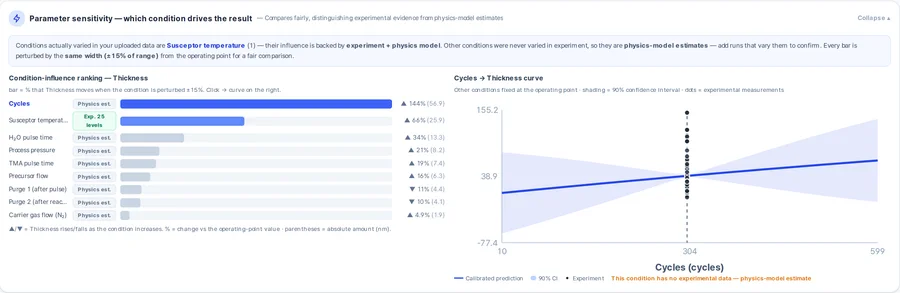
Parameter sensitivity panel
Bars marking which conditions are backed by your experiments and which rely on physics-only estimates.
SPC control chart
Statistical process control chart tracking your measured values over time; available once you have 4 or more runs.
Expandable diagnostics
Cross-validation diagnostics, data quality assessment, what-if analysis, Pareto chart, and a combined report.
How to use it
- 1Open the My equipment data tab.
- 2Select your process, material, and chemistry, then upload a CSV (or enter runs manually).
- 3Choose which measured metrics to calibrate and confirm the upload.
- 4Review the calibrated prediction, Δ, confidence band, and sensitivity panel.
- 5Add more runs over time and watch the confidence band narrow as the model learns your tool.
How the prediction is made
The physics model serves as the starting point. A Gaussian-process layer then learns the residual — the difference between your measured values and the physics prediction — for each metric you provide. Where you have data, the calibrated prediction bends toward your tool's behavior. Where you do not, it falls back to the physics baseline.
Sensitivity bars in the parameter panel show which process conditions are supported by your experimental data and which are still physics-only estimates. As you add runs that cover new regions of the process space, those bars update. The what-if panel warns you when a proposed condition sits outside the range covered by your data.
With a small number of runs the 90 % confidence band is wide, reflecting genuine uncertainty. As you accumulate measurements — especially across varied conditions — the band tightens. The SPC control chart, available from 4 runs onward, lets you monitor drift or shifts in your process over time.
Limits to keep in mind
- Uploaded data is stored in your browser and is not sent to the server, so clearing browser data will remove it.
- The learned model is labeled on screen as a demo for design reference — treat calibrated values as improved estimates, not certified specifications.
- The what-if panel warns when a condition falls outside the range of your uploaded data, but it cannot prevent you from exploring those regions.
- With fewer than 4 runs the SPC control chart is unavailable, and confidence bands will be wide.
FAQ
- How many measured runs do I need to start calibration?
- The model begins calibrating from 2 measured runs per metric. At that count the confidence band is wide, but it still shifts the prediction toward your tool. The SPC control chart requires 4 or more runs.
- Is my uploaded data sent to the server?
- No. The on-screen note confirms that uploaded data is stored in your browser and not transmitted to the server. Clearing your browser storage will remove the data, so export your combined report if you need a record.
- How does the calibration model work under the hood?
- A Gaussian process learns the residual between your measurements and the physics-model prediction. This means the model inherits the physics baseline everywhere and corrects it where your data provides evidence. The result is a prediction that tracks your specific tool where data exists and defaults to physics where it does not.